
Turn Microsoft Teams Activity Into Workforce Intelligence
Prodoscore’s native Microsoft Teams integration captures calls, chats, and meetings activity as it happens, giving unified communications leaders visibility into engagement across every seat. These interactions aggregate automatically into each employee’s daily Prodoscore, turning everyday collaboration into workforce analytics your team can act on.
Increase in Microsoft Teams adoption in a study of 65 Prodoscore customers over 93 days
Employee setup time, no software installs or device configuration required
API access only, Prodoscore never accesses call recordings or message content
What the Microsoft Teams integration does
Microsoft Teams is a cloud-based unified communications platform offering businesses a range of communication and collaboration tools. When connected to Prodoscore, calls, chats, and meetings in Teams become data points in your team’s daily Prodoscore, giving managers a consistent way to understand engagement across the business.
Every Microsoft Teams signal that matters
Prodoscore captures activity signals from Microsoft Teams with no action required from employees.
Calls received
Incoming calls are captured automatically and factored into engagement scoring.
Calls placed
Calls placed are logged the same way, giving a complete picture of two-way communication activity.
Time on calls
Time spent on calls is tracked to round out the full communication picture.
Attendee data
Call attendee and connectivity data is captured to give context to every logged call.
Chat activity
Team chat activity is tracked alongside calls and meetings.
Meetings held
Meetings scheduled and attended through Teams are captured as part of the full collaboration picture.
See the full collaboration picture
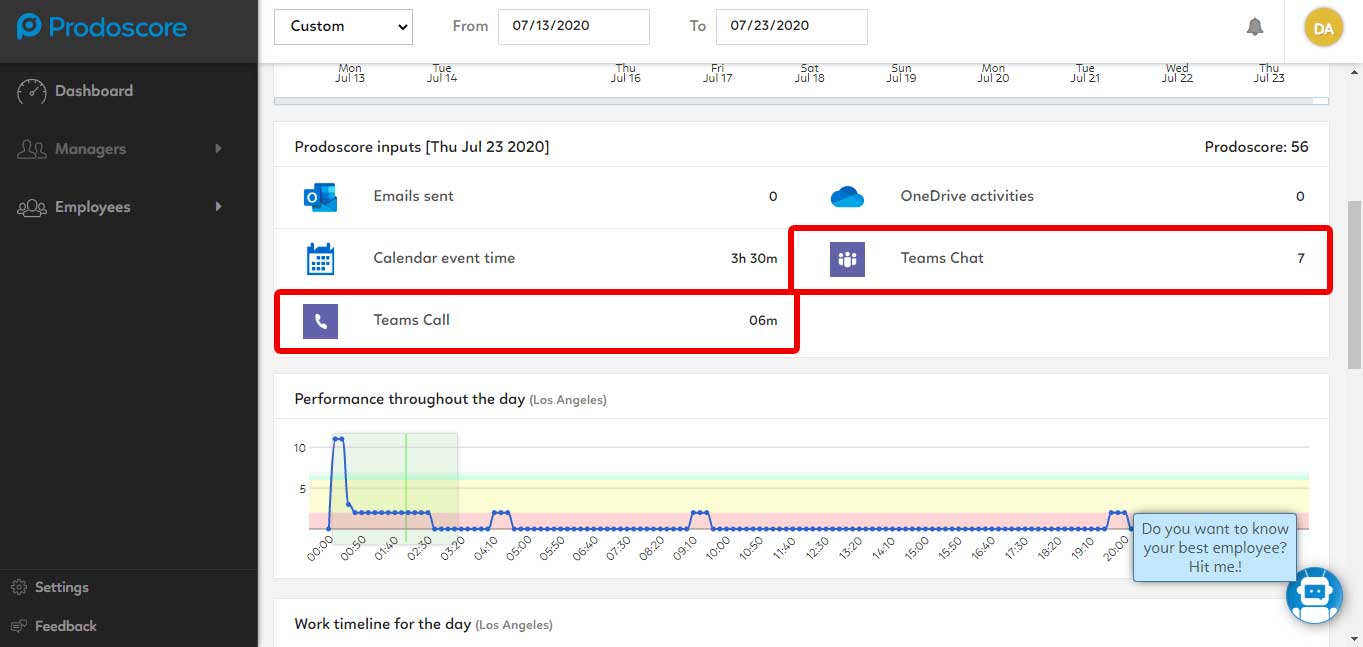
Microsoft Teams activity surfaces in your Prodoscore dashboard with full drill-down capability. Here’s what managers see.
A Daily View of Collaboration Activity
The Prodoscore dashboard surfaces Microsoft Teams activity alongside every other tool your team uses, so managers can see communication trends without switching screens or asking for status updates.
Drill Into the Details When It Matters
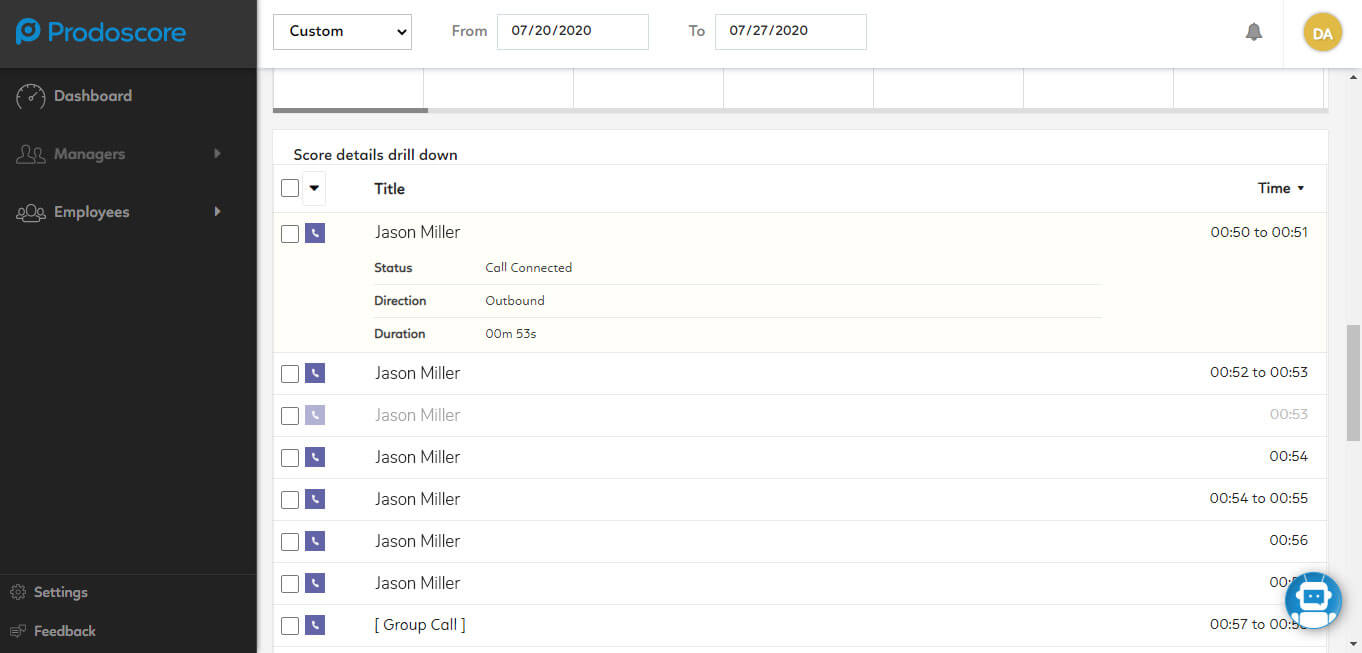
The score details view lets managers drill into individual Microsoft Teams activity, supporting coaching conversations with real data instead of guesswork.
Built for Microsoft 365 Environments
Because Microsoft Teams is deeply integrated into the Microsoft 365 ecosystem, its data integrates cleanly into Prodoscore without extra configuration, giving teams visibility from day one.
Insight, Not Oversight
Prodoscore never accesses call recordings or message content. Only activity and completion data feed into the score, so teams get visibility into effort and engagement while conversation content stays private.
Live in a day, not a quarter
Your IT admin authorizes the connection
Prodoscore begins collecting activity metadata
Scores and timelines appear in your dashboard
Your Customer Success Manager confirms setup
Prodoscore connects to Microsoft Teams through a secure, read-only API. No software is installed on employee devices, no credentials are shared, and no configuration is needed at the user level.
Once connected, Prodoscore passively captures call, chat, and meeting activity from Teams on a continuous basis. That data is normalized and surfaced in your dashboard within hours.
Microsoft Teams is available through your Prodoscore Customer Success Manager. Contact your Customer Success Manager to enable the integration. New to Prodoscore? Request a demo and our team will walk you through setup.
Collaboration adoption you can actually see
Rolling out Microsoft Teams is only half the battle. The other half is knowing whether your team is actually using it to collaborate. Prodoscore gives leaders a clear, ongoing view of Teams engagement across the business.
Microsoft Teams signal categories tracked, all rolling into one daily score.
Prodoscore accesses Microsoft Teams activity metadata only, never call recordings or message content.
Average time from authorization to live data in your dashboard. No lengthy implementation, no professional services engagement, no employee onboarding required.
Built for the leaders who need answers
IT & Communications Leaders
Visibility
See Teams adoption trends across the business without pulling reports manually.
Frontline Teams
Recognition
Get credit for the calls, chats, and meetings that move work forward.
Operations & Enablement
Coaching
Use Teams data alongside other business tool utilization metrics to spot coaching opportunities early.
HR & People Analytics
Fairness
Support fair, data-driven performance conversations using consistent engagement data.
Prodoscore captures call, chat, and meeting activity from Microsoft Teams, including call connectivity, attendees, direction, and duration. This activity aggregates into each employee’s daily Prodoscore alongside data from other connected tools.
No. Prodoscore only tracks activity and completion data. It does not access call recordings, transcripts, or chat message content.
Setup is handled by your Prodoscore Customer Success Manager, so there’s no engineering work or self-serve configuration required on your end.
Yes. Microsoft Teams activity appears in the same dashboard as every other connected tool, giving managers one consistent view of workforce activity instead of switching between systems.
Prodoscore captures activity signals only — never communication content, document contents, or personal data beyond what is necessary to generate a productivity score. All data is encrypted in transit and at rest, and access is restricted to authorized administrators and managers within your organization. For full details, visit our Security and Privacy page.