
How AtWork Group Uses Prodoscore to Optimize its Workforce
The Complete Buyer’s Guide to AI-Powered Employee Productivity Analytics Platforms
TL;DR: Choosing an employee productivity analytics platform is a significant decision with real implications for employee trust, management effectiveness, and technology ROI. This guide walks you through everything you need to evaluate your options well: what features matter, how leading platforms differ, what questions to ask vendors, and how to build the case internally for the tool that fits your organization. Whether you are comparing platforms for the first time or reconsidering a tool that is not meeting your needs, this guide gives you a framework for making a confident, well-informed decision.
Table of Contents
- Why Organizations Are Investing in Employee Productivity Analytics
- Key Features to Look for in an AI-Driven Employee Productivity Platform
- Understanding Data Collection: What Different Platforms Actually Track
- Integration Depth: The Feature That Most Buyers Underestimate
- Productivity Scores and Behavioral Analytics: What They Tell You and What They Don’t
- Platform Comparison: Prodoscore vs. ActivTrak vs. Hubstaff vs. Time Doctor vs. Teramind vs. Insightful
- Privacy, Ethics, and Culture: The Factors That Determine Rollout Success
- Questions to Ask Any Vendor Before You Buy
- How to Build the Internal Business Case
- Getting Started With Prodoscore

CHAPTER 1
Why Organizations are Investing in Employee Productivity Analytics
The demand for productivity analytics platforms is accelerating, driven by a fundamental shift in how work is organized. Remote and hybrid work environments eliminated the informal visibility that managers once relied on. At the same time, organizations began investing in more business software, creating more data about employee activity across more tools without necessarily having a system to make sense of it all.
The result is a category of leaders who are expected to manage performance effectively yet work with incomplete information. Coaching conversations happen without objective data. Performance reviews rely on recollection and impression. High performers go unrecognized because their contributions happen quietly, while underperformance goes undetected until it becomes a visible problem.
Productivity analytics platforms address this by turning the activity data already inside business tools into organized, actionable insight. The goal is not surveillance; it is visibility. And the organizations that have embraced this category consistently report improvements in team performance, manager confidence, and employee retention.
Prodoscore customers see an average 20% increase in productivity within four months of implementation. That result reflects what happens when leaders can make informed decisions rather than educated guesses.

CHAPTER 2
Key Features to Look for in an AI-Driven Employee Productivity Platform
Not every platform in this category offers the same capabilities, and not every capability is equally valuable. When evaluating options, prioritize the following:
- Integration depth with your core business tools is the most important variable. A platform that integrates with the applications your team uses every day will produce richer, more accurate data than one that relies solely on desktop monitoring or time-tracking. Look specifically for API-based integrations that capture meaningful activity data rather than just time-in-application metrics.
- Real-time data and reporting matter for fast-moving teams. Insights that are days old are less useful for proactive management than those that reflect current activity. Confirm how frequently data is updated and how quickly changes in employee activity patterns become visible in the platform.
- AI-driven insights separate the most advanced platforms from basic monitoring tools. The best platforms use AI not just to display data but to identify patterns, surface anomalies, and generate plain-language recommendations that managers can act on without needing analytics expertise. Look for natural language interfaces and proactive recommendations, not just dashboards.
- Productivity scoring provides a useful summary metric that gives managers a quick view of relative activity levels across individuals and teams. The most useful scores are calculated from multiple data sources simultaneously so they reflect the full range of an employee’s work activity, not just one dimension of it.
- Employee self-visibility is a feature that significantly affects how a tool is received by the workforce. Platforms that allow employees to view their own data reduce resistance and support a culture of transparency and self-improvement.
- Reporting and customization allow organizations to build dashboards and reports that reflect their specific performance priorities. Out-of-the-box reports are a starting point; the ability to customize them is what makes a platform genuinely useful over time.
- Ease of implementation affects how quickly your organization starts seeing value. A platform that requires months of setup and significant IT involvement will delay ROI and create friction in adoption. Look for solutions that can be operational quickly, with minimal disruption to existing workflows.
CHAPTER 3
Understanding Data Collection: What Different Platforms Actually Track
How a platform collects data fundamentally shapes the information it can provide and how employees are likely to respond to it.
There are three primary data collection approaches in this category. Time tracking is the most basic: platforms in this tier measure how long a user is active at a device, which applications are open, and sometimes which websites are visited. These platforms are easy to implement but produce shallow data that tells managers little about actual work output.
Screenshot and screen recording are used by some platforms to provide visual evidence of employee activity. This approach captures what is on screen at regular intervals or during recorded sessions. It is highly invasive by nature and tends to create the most significant cultural resistance. Most platforms that include these features position them as optional.
Deep API integration is the most sophisticated and useful approach. Platforms that connect directly to business tools via their APIs capture structured activity data, not just presence signals. They can see not only that an employee opened their CRM, but what they did inside it. Not just that email is active, but the frequency and volume of communication. This kind of rich, contextual data is what enables genuinely useful coaching and performance insights.
The most capable platforms in this category combine API integrations with a lightweight desktop agent and a browser extension, providing coverage across cloud applications, desktop software, and web-based tools without resorting to intrusive methods like screenshots.
CHAPTER 4
Integration Depth: The Feature That Most Buyers Underestimate
Integration is the feature that most buyers mention in passing and most vendors describe vaguely. It deserves much more scrutiny than it typically receives.
When a vendor says their platform integrates with Microsoft 365, ask what that means specifically. Does it capture email activity? Calendar data? Teams messaging volume? SharePoint engagement? The answer matters because a surface-level integration that simply confirms an employee is logged into 365 produces very different data than one that captures structured activity signals across every application in the suite.
The same question applies to every integration in a vendor’s portfolio. A Salesforce integration that captures opportunities touched, contacts logged, and activities completed is fundamentally different from one that only confirms app usage time. Zoom integration that captures meeting participation is different from one that also captures call duration and frequency.
When evaluating integration depth, ask vendors to walk you through exactly what data points are captured for each integration. Ask how frequently data is synced. Ask whether the integration requires any configuration on the application side, and whether it will continue to work without maintenance as the connected applications release updates.
Prodoscore currently integrates with Microsoft 365, Google Workspace, Salesforce, HubSpot, Zoom, RingCentral, Slack, ADP, ServiceNow, Jira, Bullhorn, and many more. Each integration is designed to capture meaningful activity data rather than mere presence signals, making Prodoscore genuinely representative of how an employee engages with their work.
CHAPTER 5
Productivity Scores and Behavioral Analytics: What They Tell You and What They Don’t
A productivity score is a useful management tool when it is understood correctly. It is not a measure of an employee’s worth, a substitute for judgment, or an objective truth about performance. It is a data point, and like all data points, it requires context to be meaningful.
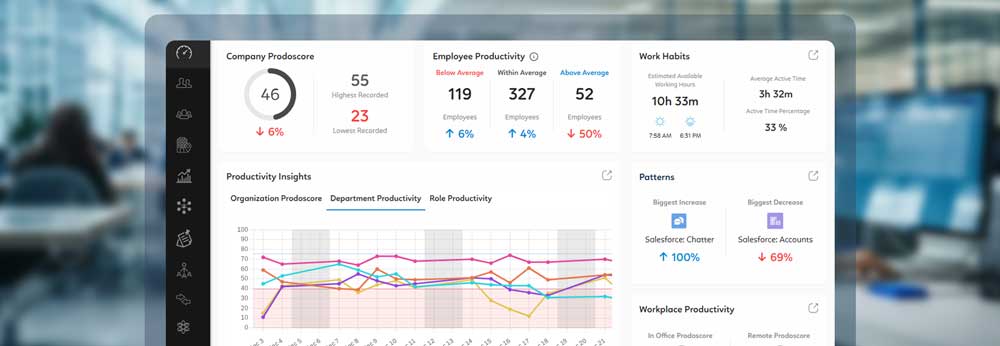
The Prodoscore is a proprietary score on a 1-to-100 scale, calculated based on activity across business applications, desktop software, and web browsing. Its primary value is as a trend indicator. A stable score indicates that an employee’s activity patterns are consistent. A score that is rising or falling tells you something has changed and that a manager should pay attention.
Comparing scores across team members can be useful for identifying patterns and coaching opportunities, but it requires care. Employees in different roles will naturally produce different score profiles because their work looks different. A useful application is to compare an individual’s current score against their own historical baseline, or against peers in the same role, rather than across the entire organization.
Behavioral analytics goes beyond a single number. They show which applications are contributing most to an employee’s score, where activity is concentrated, and where there may be gaps. This is where the most valuable coaching insights live. A manager who sees that a team member’s CRM activity has declined while their email volume has stayed constant has a very specific piece of information to bring to a performance conversation.
CHAPTER 6
Platform Comparison
The following section provides a direct comparison of the leading platforms in this category based on publicly available information and general market positioning.
Prodoscore
Prodoscore is built around deep API integrations with business tools, a proprietary productivity score, a desktop agent called Desktop Connect, and ProdoAI, which provides natural language querying of company activity data and industry benchmarks. It has all the employee-monitoring capabilities of other solutions, but Prodoscore is explicitly designed as a coaching and performance tool, with built-in employee self-visibility. Capturing all desktop applications and web-based activity with rich, structured API data from cloud tool integrations, Prodoscore produces an average productivity improvement of 20% within four months of implementation.
Website: prodoscore.com
Pricing Model: Basic Package at $19.99/user/month; Premium: custom pricing
Free Trial: No
Deployment: API integration with office workspace in ~15 min, desktop agent available to push silently to network terminals
Best For: Mid-market and enterprise organizations with remote or hybrid workforces seeking outcome-based productivity intelligence that supports coaching and retention, not surveillance
Why It’s Different: Combines API-based integration across cloud business tools with an AI-powered productivity score and conversational AI (ProdoAI Chat), enabling managers to query workforce data naturally rather than interpret dashboards. No keystroke logging, no screenshots.
G2 Rating: 4.5/5 (as of mid-2025)
SOC 2 Certified: Yes — Type 2
ActivTrak
ActivTrak is a workforce analytics platform that focuses on productivity and efficiency metrics. It tracks application and website usage, provides benchmarking tools, and includes features for visualizing productivity trends. ActivTrak offers a solid baseline of activity monitoring but its approach relies more heavily on application categorization and time-based metrics than on rich API-sourced activity data.
Website: activtrak.com
Pricing Model: Free plan (up to 3 users, 30 days data history); Essentials at $10/user/month; Essentials Plus at $15/user/month; Professional at $19/user/month (all billed annually). Screenshots, screen view, and full URL visibility available via Screen Details add-on. Annual contracts only.
Deployment: Cloud (SaaS); endpoint agent required on each monitored device
Free Trial: Yes — 14 days full Professional plan access, no credit card required
Best For: Mid-sized companies that want team-level productivity analytics and behavioral benchmarking, and are comfortable deploying a lightweight endpoint agent
Key Limitation: Integration breadth across business tools like CRM and UCaaS is narrower than API-native platforms, greatly limiting depth of data insights available
G2 Rating: 4.3/5 (as of mid-2025)
SOC 2 Certified: Yes — Type 2
Hubstaff
Hubstaff is primarily a time-tracking platform with employee monitoring features added on top. It is well-suited for organizations that need to track billable hours and project time, but its core use case is time management rather than productivity intelligence. Screenshot monitoring is a prominent feature of its offering that creates cultural considerations for teams where trust and autonomy are priorities.
Website: hubstaff.com
Pricing Model: Free 14-day trial, no credit card required. Paid plans are per-seat; specific tier pricing requires starting a trial or contacting sales.
Deployment: Cloud (SaaS); desktop and mobile apps with optional GPS tracking. Available on Windows, Mac, Linux, iOS, Android, and Chrome.
Free Trial: Yes — 14 days, no credit card required
Best For: Field service businesses, construction firms, staffing agencies, and any organization managing hourly or remote employees who need GPS tracking, timesheet automation, and payroll integration
Key Limitation: Activity metrics (mouse and keyboard inputs) measure presence and effort rather than output or work quality; lacks integration-based productivity signals across business tools like CRM and communication platforms; advanced analytics features require higher-tier plans
G2 Rating: 4.5/5 (as of live site; 1,300+ reviews)
SOC 2 Certified: Yes — Type 2 (also HIPAA, GDPR, LGPD, CCPA)
Time Doctor
Time Doctor is similarly oriented around time tracking, with features for screenshot capture, web and app monitoring, and distraction alerts. It is used widely for freelance and contract workforce management. For internal employees in professional service environments, its surveillance-oriented feature set tends to generate more resistance than adoption.
Website: timedoctor.com
Pricing Model: Basic at $6.70/user/month; Standard at $11.70/user/month; Premium at $16.70/user/month (all billed annually; month-to-month rates are $8/$14/$20); Enterprise custom pricing. No free plan — 14-day free trial available.
Deployment: Cloud (SaaS); desktop agent required
Free Trial: Yes — 14 days, no credit card required
Best For: Outsourcing firms, BPOs, and agencies that need granular proof-of-work documentation and client-billable hour tracking with screenshot evidence
Key Limitation: Manual timer model requires active employee participation to function accurately; key features including integrations and AI analytics are locked behind mid-to-upper tiers; customer support and billing practices have received significant negative reviews across multiple platforms
G2 Rating: 4.4/5 (as of mid-2025)
SOC 2 Certified: Yes
Teramind
Teramind occupies the most explicitly security-focused end of the spectrum. It includes employee monitoring, insider threat detection, and user behavior analytics designed in part for compliance and data loss prevention. It offers extensive recording and capture capabilities, which make it well-suited for high-security environments but potentially excessive for general performance management.
Website: teramind.co
Pricing Model: Four tiers — Starter, UAM (User Activity Monitoring), DLP (Data Loss Prevention), and Enterprise/Government. Pricing is seat-count based and requires contacting sales; a 5-seat minimum applies.
Deployment: Cloud (SaaS), on-premises, or private cloud; available in AWS GovCloud and Azure Government
Free Trial: Yes
Best For: Security-focused organizations in regulated industries (finance, healthcare, government) that require insider threat detection, DLP enforcement, and forensic-grade audit logs
Key Limitation: Surveillance-first architecture — keystroke logging, live screen recording, and content blocking — creates significant employee trust and morale risk when deployed in productivity-focused rather than security-focused contexts; pricing requires sales engagement with no self-serve option; 5-seat minimum adds cost friction for smaller teams
G2 Rating: 4.6/5 (as of live site; 148 reviews)
SOC 2 Certified: Yes
Insightful
Insightful (formerly Workpuls) offers productivity tracking with time tracking, employee monitoring, and project management features. Its platform includes screenshot capabilities and automatic time-mapping, with a focus on comparing actual work time with productive work time. It positions itself as a flexible productivity tool for both in-office and remote teams.
Website: insightful.io
Pricing Model: Workforce Analytics at $10/seat/month; Workflow Optimization at $15/seat/month; Combo Plan (both) at $20/seat/month; Enterprise custom pricing. Add-ons available for Workspace Security (insider threat detection + audit logs), On-Demand Screenshots, Screen Recording, and Data Warehouse Integrations
Deployment: Cloud (SaaS); on-premises available for 250+ seat deployments; endpoint agent required
Free Trial: Yes — 7 days, no limitations (except automatic time mapping)
Best For: Mid-market companies in process-heavy industries (finance, insurance, BPO, call centers) that want both workforce analytics and workflow-level process optimization in a single platform
Key Limitation: Core security features (insider threat detection, screenshots, screen recording) are no longer included in base plans and require paid add-ons, which can significantly increase per-seat cost; on-premises deployment requires a minimum of 250 seats
G2 Rating: 4.6/5 (as of live site)
SOC 2 Certified: Yes (also ISO 27001, HIPAA, GDPR, CCPA certified)
The clearest differentiator between these platforms is their fundamental orientation. Prodoscore is designed as a productivity intelligence and coaching tool. Most of the others are designed, at least in part, as time-tracking or surveillance tools that have expanded into productivity analytics. That difference in orientation shapes both the data they produce and the culture they create.
CHAPTER 7
Privacy, Ethics, and Culture: The Factors That Determine Rollout Success
The most common reason productivity platforms fail to deliver their promised value is not a technical shortcoming. It is a cultural one. When employees experience a monitoring tool as surveillance, they disengage, resist, and sometimes find ways around it. The data becomes unreliable, the insights become misleading, and the tool that was supposed to improve performance ends up damaging morale.
Avoiding this outcome starts with choosing a platform that was built with employee trust in mind. Features like employee self-visibility, transparent data collection policies, and the absence of invasive monitoring capabilities are not just ethical considerations; they are practical ones. The tool that employees feel comfortable with is the one they will interact with honestly, which is the only way the data it produces is worth anything.
Beyond platform selection, rollout communication is critical. Employees should know before implementation what the platform tracks and what it does not, why the organization is using it, and how the data will and will not be used. Leaders who communicate this clearly and who demonstrate their commitment to using the tool for development rather than discipline will see far better adoption than those who deploy quietly.
Organizations that have the most success with productivity intelligence tools tend to share a few characteristics. They treat the data as one input among many rather than as the final word on performance. They use early findings to celebrate high performers and support struggling ones, not to catch people out. And they build a cadence of regular review into their management practice so the tool becomes part of the normal workflow rather than an occasional surveillance check.
CHAPTER 8
Questions to Ask Any Vendor Before You Buy
Before committing to any productivity analytics platform, every buyer should have clear answers to certain questions. Use the following as a starting point in your vendor conversations.
What data does the platform collect, and how? Ask specifically whether screenshot capture, keystroke logging, or screen recording is included, and whether it is on by default. Ask exactly what activity data is captured through each integration.
Can employees see their own data? This single feature has a significant effect on how a tool is received by the workforce. Confirm that employee-level visibility is available and easy to access.
How long does implementation take, and what is required from IT? A platform that requires months of setup or significant technical resources will delay value and create internal friction. Look for solutions that can be deployed quickly.
What integrations are available and how deep are they? Ask for specifics on what data points each integration captures, not just a list of connected applications.
How does the platform handle data privacy and security? Ask about data storage, access controls, compliance with relevant regulations, and how the vendor handles data deletion requests.
What does the AI actually do? If a platform advertises AI capabilities, ask for a demonstration of specific AI-generated insights. Look for plain-language recommendations, not just automated reports.
What does the customer support and implementation model look like? Understand what ongoing support looks like beyond the sales process.
CHAPTER 9
How to Build the Internal Business Case
Getting organizational alignment for a productivity analytics investment requires more than a compelling vendor demo. It requires a business case that addresses the concerns of every stakeholder who will be affected: IT, HR, legal, finance, and the frontline managers who will actually use the tool day-to-day.
For IT, the key questions are security, data privacy, and implementation burden. Address these proactively by documenting the platform’s security certifications, data-handling practices, and installation requirements up front.
For HR, the central concern is almost always cultural. HR leaders need to understand not just what the platform does, but how it will be introduced to employees and what policies will govern its use. Prepare a rollout communication plan that includes employee-facing messaging, a clear statement of purpose, and a process for employees to ask questions or raise concerns.
For finance, build the ROI case around the metrics that CFOs recognize: productivity improvement, turnover reduction, and license optimization. Prodoscore’s 20% average productivity improvement within four months, combined with documented turnover cost savings and potential software license reductions, creates a concrete financial case.
For legal, address data privacy compliance early. Confirm with your vendor how the platform handles data subject requests, where data is stored, and what compliance frameworks it supports.
For frontline managers, the business case is simpler: this tool will give you better information to make better decisions. Demonstrate that with real examples and specific use cases relevant to their team’s context.
CHAPTER 10
Getting Started With Prodoscore
Prodoscore is designed to be operational quickly and to start delivering value without a lengthy implementation process. The platform can be up and running in as little as 15 minutes, with integrations to your existing business tools established through a straightforward setup process that requires no changes to employee workflows.
The integration setup begins with connecting Prodoscore to your organization’s core business applications through their APIs. For most organizations, this starts with Microsoft 365 or Google Workspace, your CRM, and your primary communication and calling tools. From there, additional integrations can be added as needed.
Once integrations are live, Prodoscore begins populating activity data and generating productivity scores immediately. Within the first few weeks, patterns begin to emerge, giving managers meaningful context for their teams. Within the first four months, most Prodoscore customers begin to see measurable productivity improvements as managers use the data to coach more effectively and employees develop greater awareness of their own activity patterns.
ProdoAI is available from day one, providing managers with a natural language interface to query their team’s data and access industry benchmarks without building custom reports.
Prodoscore’s team supports the rollout process with onboarding resources, customer success support, and ongoing guidance to ensure the platform delivers its full value over time.
If you are ready to stop making people decisions based on incomplete information, Prodoscore is built to help you do exactly that.
Learn more and request a demo at prodoscore.com.