
Turn Jira Activity Into Workforce Intelligence
Prodoscore connects to your organization’s Jira environment and translates daily issue-tracking activity across Epics, Stories, Bugs, Tasks, Subtasks, and custom issue types into a single, objective productivity score for every employee. All of this happens without any software installed on employee devices and without reading the content of a single issue.
Jira issue types tracked, from Epics and Stories to Bugs and custom issue types
Employee setup time — no software installs, no device configuration required
API access only — Prodoscore never reads the content of issues or comments
What the Jira integration does
Prodoscore uses Jira’s API to passively capture activity metadata, not issue content, from the project management tool your teams already use every day. That data feeds into your Prodoscore dashboard continuously, giving managers and engineering leaders a transparent, activity-based view of how work is actually getting done across your organization, whether employees are in the office, remote, or hybrid.
Every Jira issue type that matters
Prodoscore captures activity signals across all standard Jira issue types, plus any custom issue types configured in your organization’s Jira instance, with no action required from employees.
Epic-level progress
Track employee activity on Jira Epics, the large bodies of work that span multiple sprints and teams. Understand which employees are driving progress on your highest-priority initiatives and where momentum is stalling.
Story completion activity
Capture Story-level activity across your teams. See which employees are actively progressing user stories through your workflow, and identify patterns in velocity and output across individuals and teams.
Bug resolution activity
Track how actively employees are identifying, logging, and resolving Bugs in Jira. Understand which individuals are contributing most to issue resolution and where backlogs may be building without sufficient attention.
Task execution
See task-level activity for every employee in Jira. Understand who is consistently completing assigned work, who may be carrying an unbalanced load, and how individual task output contributes to team-level productivity scores.
Subtask engagement
Capture Subtask activity within larger work items. Subtasks often represent the day-to-day execution work that makes or breaks sprint delivery, and Prodoscore surfaces that activity so it contributes to each employee’s daily score.
Custom issue types
Prodoscore automatically captures activity from any custom issue types configured in your Jira instance. Whatever your team calls their work items, that activity is tracked and reflected in each employee’s productivity score.
What you can see inside Prodoscore
Every Jira activity signal surfaces in your Prodoscore dashboard with full drill-down capability. Here’s what managers and engineering leaders see.
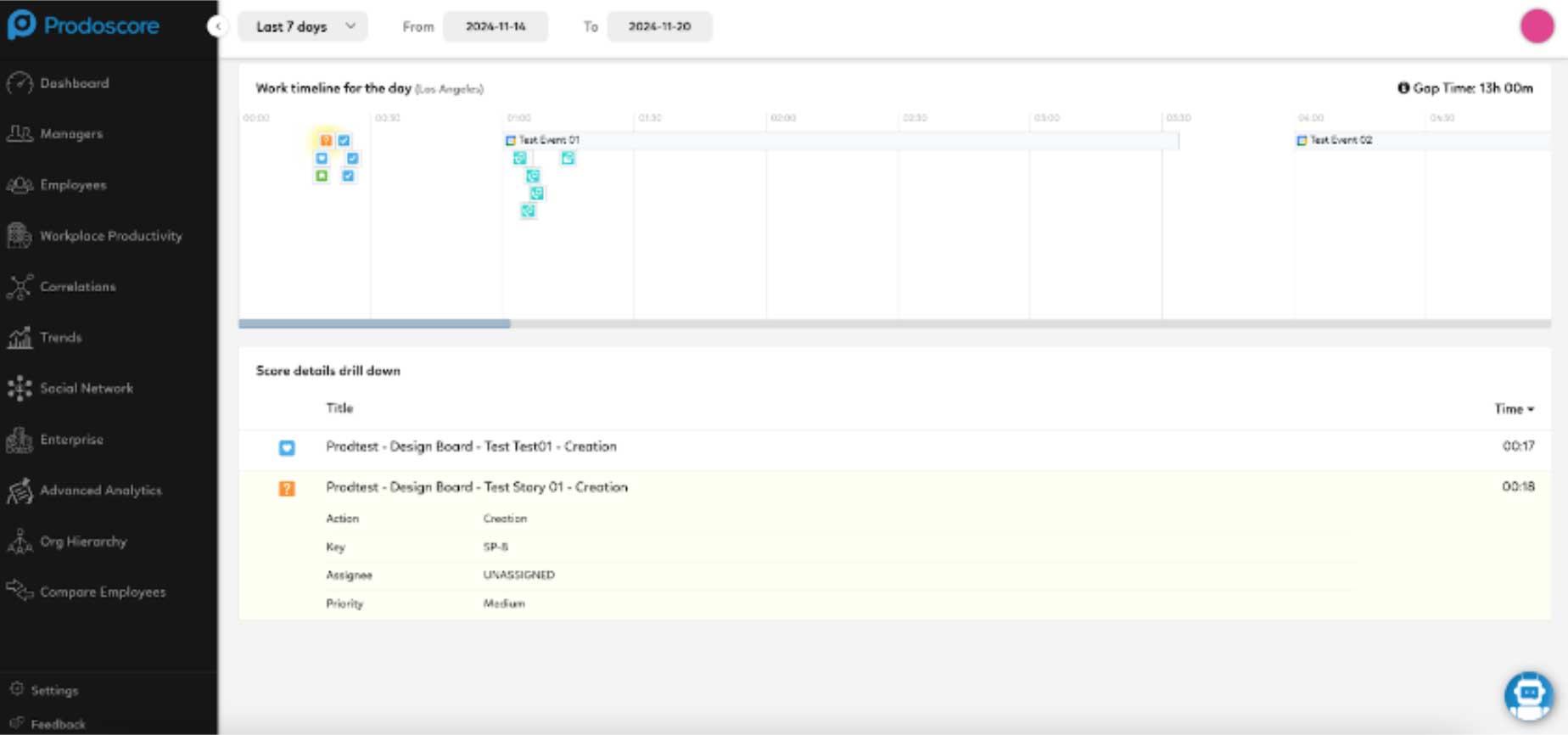
Work Timeline
The Work Timeline shows hour-by-hour activity for every employee on any given day. Icons represent specific Jira issue types, including Epics, Stories, Bugs, and Tasks, so you can understand not just whether someone worked, but how and when. Click any activity to see detail. Use it to identify peak productivity windows, spot engagement gaps, and compare work rhythms across engineers or teams.
Jira Activity Drill-Down
Click the Jira icon in the score drill-down to see a full breakdown of an employee’s issue activity on any given day, including issue types actioned, counts, and timestamps. Prodoscore captures activity metadata only, never the content of issues or comments. Use this view to identify productivity outliers, understand workload distribution, and anchor coaching conversations in concrete activity data rather than impressions.
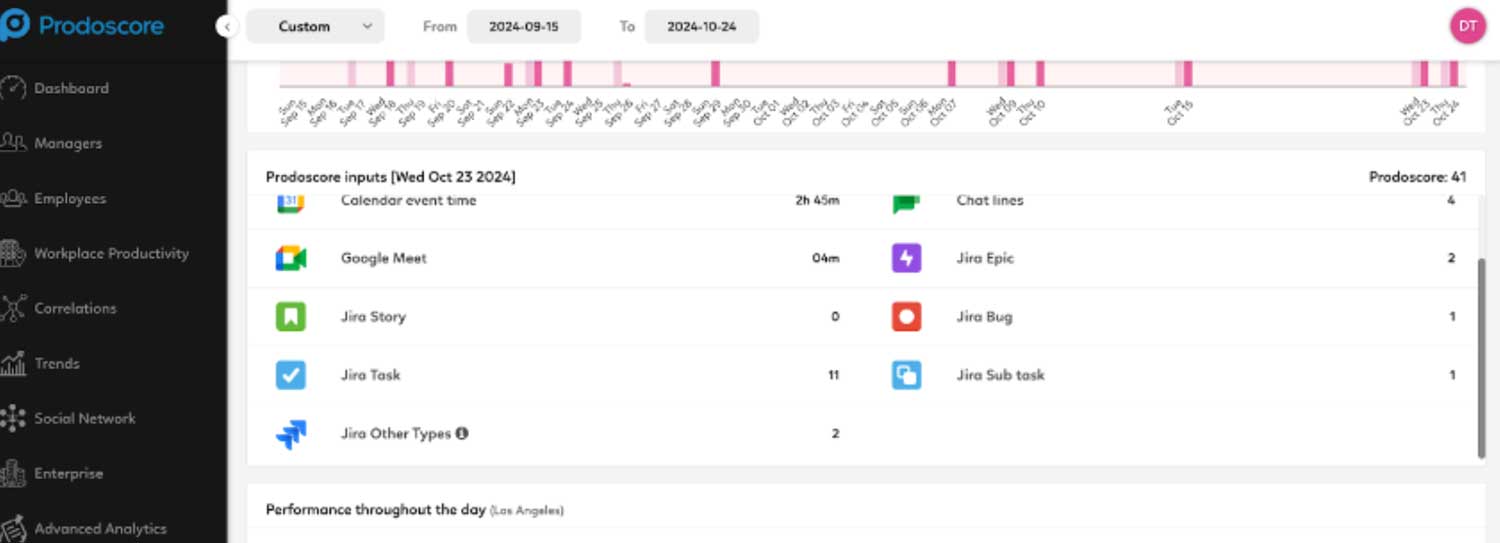
Issue Type Breakdown
The score detail drill-down breaks Jira activity down by issue type, showing how many Epics, Stories, Bugs, Tasks, Subtasks, and custom issues an employee interacted with on a given day. This gives managers a clear picture of where an employee’s effort is concentrated and whether it aligns with team priorities.
Sprint Engagement
Prodoscore surfaces Jira activity patterns across sprint cycles, making it easy to spot employees who are consistently active throughout a sprint versus those whose activity is concentrated at the deadline. Use this to identify workload imbalances, support better sprint planning, and recognize engineers whose steady daily output drives team delivery.
Live in a day, not a quarter
Your IT admin authorizes the connection
Prodoscore begins collecting activity metadata
Scores and timelines appear in your dashboard
Your Customer Success Manager confirms setup
Prodoscore connects to Jira through Atlassian’s secure API. Your Jira administrator grants read-only access to your Jira instance, with no software installed on employee devices, no credentials shared, and no configuration required at the user level.
Once connected, Prodoscore passively captures activity signals across all tracked Jira issue types on a continuous basis. That data is normalized and surfaced in your dashboard within hours. Most organizations are fully live within a single business day.
To enable the Jira integration, contact your Prodoscore Customer Success Manager. New to Prodoscore? Request a demo and our team will walk you through setup.
Jira is where your team’s work lives. Now you can see it.
Most organizations have been running Jira for years without any visibility into how effectively their workforce is using it. Prodoscore changes that by turning the activity your team generates every day into intelligence leaders can act on.
Companies worldwide run on Jira, generating millions of issue activity signals that most organizations have no way to interpret or act on.
Prodoscore accesses Jira metadata only. No issue content, no comment bodies, no attachment contents, ever. Employee privacy is a core design principle, not an afterthought.
Average time from authorization to live data in your dashboard. No lengthy implementation, no professional services engagement, no employee onboarding required.
Built for the leaders who need answers
HR Leaders
Retention
A sudden drop in Jira activity, issue completions, and sprint engagement often signals disengagement weeks before an employee resigns. Prodoscore surfaces these leading indicators so HR leaders can intervene early and retain people worth keeping.
Executive Leadership
Visibility
With distributed engineering and product teams, leaders can no longer rely on presence as a proxy for performance. Prodoscore provides objective, Jira-backed productivity data to support confident workforce decisions, whether evaluating team capacity, assessing individual output, or planning headcount.
IT & Operations
Adoption
Prodoscore’s integration data reveals Jira adoption patterns across your workforce. Identify underutilized licenses, surface teams with low issue-tracking engagement, and make smarter decisions about your software investment, using data that goes beyond simple login counts.
Managers
Coaching
When an engineer is struggling, managers need specifics, not impressions. The Jira drill-down gives managers concrete, activity-level data to anchor coaching conversations in fact, identify workload imbalances, and recognize high performers with evidence to back it up.
No. Prodoscore captures activity metadata only, such as the number of issues created, updated, or resolved, but never reads the title, description, or comment content of any issue. Employee privacy is a core design principle. The integration operates through Jira’s read-only API, which means Prodoscore can see that an activity occurred but cannot see what it contained.
Prodoscore works with most commercial Jira plans that include API access, which covers the majority of Standard, Premium, and Enterprise cloud tiers. Your Customer Success Manager can confirm compatibility with your specific Jira instance configuration during the onboarding process.
Most organizations are live within a single business day. Setup requires only a Jira administrator to authorize the connection through Atlassian’s standard API flow. There is no software to deploy, no agents to install on employee devices, and no configuration required at the user level. Contact your Customer Success Manager to get started.
Yes. Prodoscore is designed to aggregate data from multiple integrations simultaneously. The more tools connected, the richer and more complete the productivity signal. Many customers run Jira alongside Google Workspace, Microsoft 365, Salesforce, and other communication or CRM platforms. All integration data feeds into a single unified score and dashboard.
Prodoscore captures activity signals only, never record content, note content, or personal data beyond what is necessary to generate a productivity score. All data is encrypted in transit and at rest, and access is restricted to authorized administrators and managers within your organization. For full details, visit our Security and Privacy page.